
See the True Source of Network Performance
Explore podcasts, real-world stories, guides, and insights from the engineers behind Statseeker — the network intelligence platform built to detect, prove, and prevent performance issues.

No credit card. No sales calls. Full platform access.
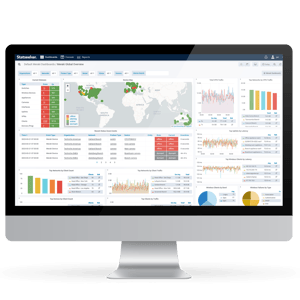
Statseeker Podcasts

Tech Bytes Podcast
Statseeker recently joined the Packet Pushers Tech Bytes podcast, where our colleagues Dylan Hensler and Andrew Greenlaw discuss how modern networks require deeper visibility, faster troubleshooting, and long-term historical data.
Total Network Operations Podcast
In this Total Network Operations episode, Dylan Hensler from Statseeker, shares insights on real operational challenges, lessons learned, and what it takes to manage complex networks in the real world.
SourceForge Podcast
Statseeker joined the SourceForge podcast, where Dylan Hensler discussed how modern network monitoring requires real-time visibility, granular data, and the ability to troubleshoot performance issues before they impact users. The conversation explores how network teams can move beyond traditional monitoring to gain deeper operational insight across complex environments.
Resources for Network Engineers
2026 Guide to Network Performance Monitoring
A practical guide to modern Network Performance Monitoring (NPM). Learn how to baseline performance, and how to catch bottlenecks before users feel them.
The Top 5 Network KPIs For Engineers That Still Matter in 2026
Cut through the noise. Learn the five KPIs that most reliably signal network health, so you can spot issues earlier, troubleshoot faster, and report with confidence.

Detect faster. Prove Root Cause. Prevent Recurrence.
Stop guessing. Learn how to detect performance issues early using high-resolution monitoring, faster polling, and clear evidence so you can prove root cause and act fast.
Powerful monitoring on a single server.
Works on day one. Remains reliable for years.
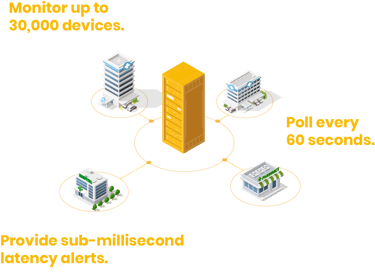
Statseeker deploys fast and stays lightweight.
-
Single-server architecture with optional remote polling capabilities for distributed environments.
-
Operational in hours, not weeks, not months
-
Runs on physical servers, VMs, or public/private cloud
-
Ideal for security-sensitive and regulated environments

Detect Faster
60-second polling at scale captures short-lived congestion and interface error spikes that longer polling intervals miss, surfacing issues in near real time and revealing the operational impact of microbursts.
- Discover devices automatically with minimal setup
- Maintain a real-time view of network state across all sites
- Monitor availability and health metrics at high frequency
- Identify outages immediately, even in remote locations
Prove Root Cause
Granular historical data is retained long-term with no forced rollups — so spikes and short-lived anomalies don’t get smoothed away. Investigate incidents days, months, or years later with the same resolution you had in real time.
- Eliminate monitoring blind spots
- Correlate device state across sites and regions
- Distinguish between hardware failure and environmental issues
- Validate outages with clear, defensible data
Prevent Recurrence
Move from reaction to prevention. Identify behavioral changes, anomalies, and early warning signs before issues escalate.
- Baselining of normal network behavior
- Early anomaly detection
- Threshold-based alerts for developing issues
- Hardware health monitoring to catch stress before failure
Statseeker was built by engineers for:
Network engineers responsible for uptime and performance.
Enterprise network where performance directly affects uptime, capacity planning, and user experience.
NetOps teams supporting distributed or multi-site environments.
Data center and campus where visibility into core switching and routing is critical.
Network administrators who need defensible, data-driven insight.
Remote sites and distributed infrastructure where distance, scale, and inconsistent links make issues harder to isolate.
IT professionals who want fewer suprises, not more dashboards.
Complex multi-vendor network environments where a single, consisten view of full-fidelity data is essential.

No credit card required
Deploy in minutes
Supports multi-vendor environments
Unlimited historical data included
Stop reacting. Start preventing.
Engineers around the world are moving toward proactive network management using intelligent analytics.
Start a free Statseeker trial and see how real-time network intelligence helps you move from reactive firefighting to proactive prevention.
- Zero-touch monitoring operations
- High-scale polling engine
- Dashboards that lead to answers
- Actionable alerting, not noise
- Traffic and flow visibility
- Accurate inventory & MAC/IP history
Frequently Asked Questions About Network Performance Monitoring
What is Statseeker?
Statseeker is a high-performance Network Performance Monitoring (NPM) and Network Intelligence platform designed to help network engineers monitor large-scale infrastructure with speed and accuracy.
It automatically discovers network devices, polls interfaces every 60 seconds, and stores full-fidelity historical performance data, giving engineers the visibility needed to detect issues early, prove root cause, and prevent recurring performance problems.
While traditional monitoring tools focus on basic metrics, Statseeker provides deeper network intelligence by collecting high-resolution data across your entire infrastructure. This allows teams to understand traffic patterns, identify bottlenecks, and make more informed operational decisions.
Statseeker is trusted by organizations monitoring thousands — and even hundreds of thousands — of interfaces across enterprise and distributed networks.
What is Network Performance Monitoring (NPM)?
Network Performance Monitoring (NPM) is the process of continuously measuring and analyzing network traffic, device performance, and infrastructure health to ensure networks operate efficiently. NPM tools collect data from routers, switches, and other devices to help engineers detect congestion, troubleshoot issues, and maintain optimal network performance.
Why is network performance monitoring important?
Modern networks support critical business applications, cloud services, and thousands of connected devices. Without proper monitoring, performance issues like congestion, latency spikes, or packet loss can go unnoticed until they impact users. Network Performance Monitoring helps teams detect issues early and maintain reliable infrastructure.
What metrics should network engineers monitor?
Some of the most important network performance metrics include:
- Interface utilization
- Packet errors and discards
- Latency and jitter
- Bandwidth consumption
- Device availability
Monitoring these KPIs helps engineers identify bottlenecks, capacity issues, and abnormal traffic patterns.
How often should a network monitoring tools poll?
Polling frequency determines how quickly a monitoring system can detect changes in network performance. Many traditional monitoring tools poll devices every 5–10 minutes, which can miss short-lived performance spikes. High-resolution monitoring platforms can poll networks every 60 seconds, providing much greater visibility into traffic patterns and transient issues.
Which protocols are used for network monitoring?
Most network monitoring tools use protocols such as:
- SNMP (Simple Network Management Protocol)
- NetFlow / sFlow / IPFIX
- ICMP
These protocols allow monitoring platforms to collect performance metrics, traffic data, and device status information.
How does NPM help troubleshoot network issues?
NPM platforms provide historical performance data and real-time visibility into network traffic. Engineers can use this information to identify when performance degradation began, determine which devices or interfaces are affected, and prove the root cause of network problems.
What should you look for in an NPM tool?
When evaluating NPM platforms, organizations should consider:
- Scalability for large networks
- High-resolution data collection
- Accurate historical performance data
- Automated network discovery
- Clear dashboards and reporting tools
These capabilities help network teams monitor infrastructure effectively and resolve performance issues faster.